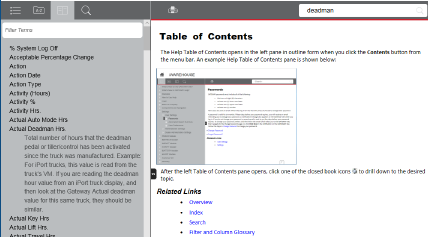
Follow the steps below to access the Glossary tab:
1.From within the system, click the Glossary tab on the menu bar at the top of the Help window.
2.Select an entry from the Term section in the left pane. The definition opens below the term. Click the term again to close the definition.
In the example, "Actual Deadman Hrs" was selected in the Term: section. The definition of "Actual Deadman Hrs" appears below it in the Definition: section. Notice that the information in the right pane remains unchanged.
Related Links